
Managing computers one at a time may work when a business has five employees in one office. It becomes inefficient when an IT team supports hundreds of laptops, servers, virtual machines, network devices, and remote workers spread across different locations.
This is where Cloud based RMM software becomes useful.
Remote monitoring and management, commonly shortened to RMM, gives IT professionals a central platform for monitoring device health, installing updates, automating maintenance, responding to alerts, and troubleshooting systems remotely. Instead of waiting for users to report failures, technicians can identify warning signs and resolve many problems before they cause serious downtime.
This guide explains how cloud RMM works, which features genuinely matter, what security risks must be controlled, and how managed service providers and internal IT departments can select the right platform without paying for unnecessary tools.
What Is Cloud-Based RMM?
Cloud-based remote monitoring and management is software that allows IT teams and managed service providers to monitor, maintain, and support endpoints through an internet-accessible management console.
The endpoints may include:
- Desktop computers
- Laptops
- Physical servers
- Virtual machines
- Network switches and routers
- Mobile devices
- Cloud-hosted systems
- Internet of Things devices
Most RMM platforms install a lightweight software agent on each managed endpoint. That agent collects information about the device and communicates with the provider’s cloud platform. Technicians then use a browser-based dashboard to view device health, receive alerts, execute scripts, install patches, and start remote support sessions.
AWS describes modern RMM as technology used to observe and maintain IT infrastructure and smart devices remotely. It notes that modern platforms can monitor both traditional on-premises infrastructure and cloud resources from a centralized system.
The word cloud-based refers to the location of the central RMM application. The vendor hosts and maintains the management platform, while customers access it as a software-as-a-service product. The organization does not normally need to install and maintain its own central RMM server.
RMM is more than remote desktop software
Remote desktop software mainly allows a technician to connect to and control another computer. An RMM platform typically adds continuous monitoring, automated alerting, patch management, asset inventory, scripting, reporting, policy enforcement, and multi-device administration.
Remote access may be one component of an RMM platform, but it is not the complete platform.
RMM is not the same as PSA
Professional services automation, or PSA, is used to manage business operations such as service tickets, technician time, contracts, billing, and customer records.
RMM manages the technology environment. PSA manages the service-delivery workflow around that environment. Many MSP platforms integrate the two so an RMM alert can automatically create and prioritize a service ticket.
RMM is not a replacement for endpoint security
An RMM platform may monitor antivirus status, deploy security software, install patches, or integrate with endpoint detection and response tools. It should not automatically be treated as a complete cybersecurity platform.
Organizations still need appropriate controls for identity, endpoint protection, email security, backups, network security, vulnerability management, and incident response.
How Does Cloud RMM Work?
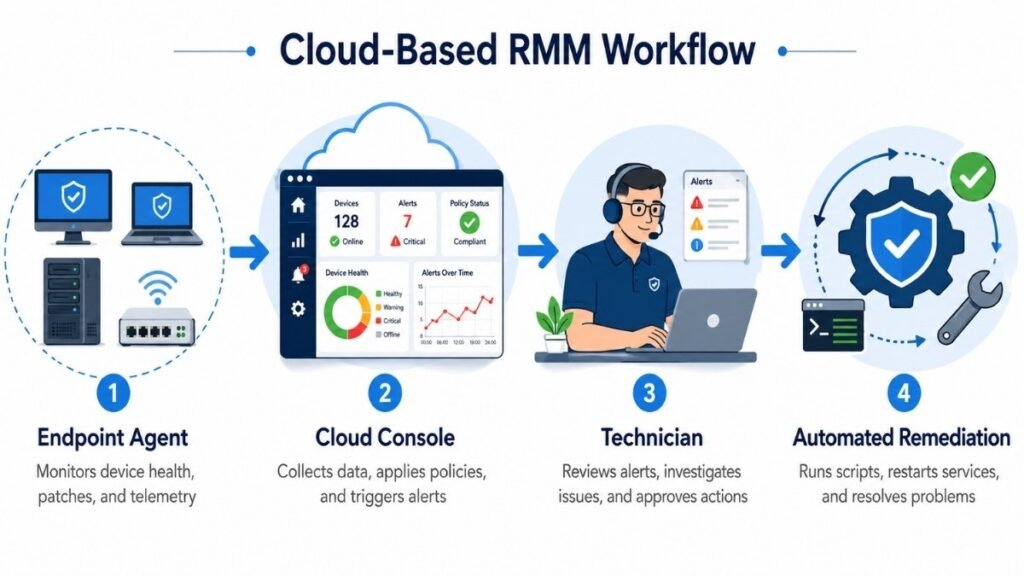
A typical cloud RMM system uses an agent-and-console architecture.
1. An agent is deployed
The IT team installs an RMM agent on every endpoint it wants to manage. Deployment may be completed manually, through a group policy, using a device-management platform, or with another software deployment tool.
The agent runs as a background service and communicates with the RMM provider’s cloud infrastructure.
2. Device data is collected
The agent may collect information such as:
- CPU and memory usage
- Available disk space
- System uptime
- Installed applications
- Operating system version
- Missing updates
- Running services
- Event logs
- Antivirus status
- Hardware specifications
- Network availability
Exactly what gets collected depends on the platform, device type, operating system, and policies configured by the administrator.
3. Data appears in a central dashboard
Technicians can view managed endpoints from one console rather than checking each computer separately. MSPs may also separate devices by customer, site, department, operating system, or service agreement.
This multi-tenant structure is particularly important for MSPs because it allows one technical team to support multiple client environments while maintaining administrative separation.
4. Monitoring policies are applied
Administrators define thresholds and conditions that should trigger an alert.
For example, an alert could be generated when:
- Free disk space falls below 10%
- CPU usage remains above 90%
- A critical Windows service stops
- Antivirus protection becomes disabled
- A backup job fails
- A server goes offline
- A critical patch remains missing
- A new application is installed
- Repeated login failures are detected
Poorly configured thresholds can produce hundreds of low-value alerts. A mature RMM deployment therefore requires alert tuning, escalation rules, maintenance windows, and automated suppression of duplicate events.
5. The platform starts a response
Once a condition is detected, the RMM platform can notify a technician, create a ticket, execute an automated remediation script, or combine several actions.
For example, when a monitored print service stops, the RMM platform could restart it automatically. If the restart fails, it could create a high-priority ticket containing the endpoint name, error details, and actions already attempted.
ConnectWise explains that RMM agents send device-health information to the central platform, where detected problems can generate alerts and service tickets. The platform may also help technicians resolve problems before the customer recognizes that an issue exists.
RMM platforms can also alert technicians when managed endpoints experience DNS and network connectivity problems that prevent them from reaching essential websites or cloud services.
Essential Features of a Cloud RMM Platform
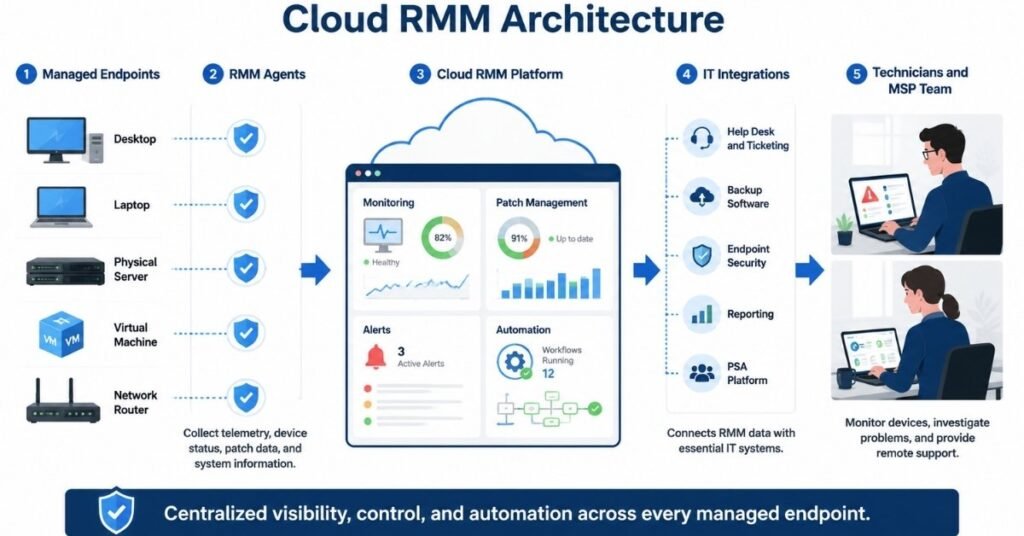
Long feature lists can make every platform appear equally capable. In practice, the quality, reliability, and depth of each feature matter more than the number of features printed on a sales page.
The following capabilities deserve the closest evaluation.
Real-time endpoint monitoring
The platform should monitor critical device and service conditions without generating excessive noise.
Look for customizable thresholds, device-specific policies, dependency rules, maintenance windows, alert deduplication, and clear escalation paths. A server should not use the same monitoring policy as a salesperson’s laptop.
Automated patch management
Effective patch management should cover operating systems and widely used third-party applications.
The platform should allow technicians to:
- Approve or reject updates
- Test patches on a limited device group
- Schedule deployment windows
- Delay risky updates
- Reboot devices under controlled conditions
- Track installation failures
- Produce patch-compliance reports
Patch automation saves time, but blindly installing every update across every endpoint can create operational problems. A staged deployment process is safer.
Secure remote access
Technicians need to connect to devices without asking users to install a separate application for every support incident.
Evaluate session encryption, multifactor authentication, user-consent settings, role-based permissions, session recording, file-transfer controls, clipboard controls, idle-session timeouts, and audit logs.
The platform should make legitimate support convenient without giving every technician unrestricted access to every customer device.
Scripting and automation
Automation is one of the main reasons to adopt RMM.
Technicians may use PowerShell, shell scripts, predefined automation components, or visual workflow builders to complete repetitive tasks such as:
- Removing temporary files
- Restarting services
- Installing approved applications
- Correcting configuration settings
- Mapping network drives
- Collecting diagnostic logs
- Creating local accounts
- Removing prohibited software
- Checking encryption status
- Running security scans
Scripts should be tested, version controlled, reviewed, and limited according to technician roles. A poorly written script executed across thousands of devices can cause more disruption than the original problem.
Hardware and software inventory
The platform should maintain an accurate inventory of managed devices, components, installed applications, operating systems, serial numbers, warranties, and ownership details.
This information can support license management, device replacement planning, security investigations, and compliance reporting.
Reporting and dashboards
Useful reports should answer operational questions rather than simply display large quantities of data.
An MSP may need reports covering:
- Patch compliance
- Device availability
- Antivirus status
- Alert volume
- Ticket trends
- Asset lifecycle
- Technician activity
- Service-level performance
- Failed automation jobs
- Client-facing maintenance summaries
Check whether reports can be customized, scheduled, exported, and separated by customer or business unit.
Integrations and API access
RMM does not operate in isolation. It may need to exchange information with PSA, ticketing, documentation, backup, security, identity, billing, and reporting systems.
A documented API, reliable webhooks, and supported native integrations reduce manual work and prevent technicians from constantly switching between disconnected dashboards.
Multi-tenant management
MSPs should be able to manage several customers without mixing their devices, reports, credentials, alerts, or automation policies.
Important multi-tenant capabilities include customer-specific roles, separate policies, delegated administration, customer-level reporting, site grouping, and protected credential storage.
Benefits and Limitations of Cloud-Based RMM
Cloud RMM can substantially improve IT operations, but it is not automatically the correct solution for every organization.
Main benefits
Faster deployment
Because the provider hosts the management infrastructure, the customer can focus on deploying agents and configuring policies. There is no central server to purchase, size, install, patch, and maintain.
Centralized visibility
A technician can monitor devices across offices, homes, data centers, and customer locations through a unified console.
Easier scalability
New endpoints can normally be added by deploying additional agents. The organization does not have to purchase new central-server hardware every time its managed environment grows.
Cloud RMM is particularly valuable for organizations with distributed or changing infrastructure because capacity is managed by the software provider rather than through an internally maintained server.
Reduced on-site support
Many software, configuration, and maintenance problems can be investigated remotely. This can reduce travel costs and shorten response times.
Proactive maintenance
Continuous monitoring allows IT teams to detect capacity, availability, update, and service problems before they develop into larger incidents.
Consistent policy enforcement
Administrators can apply standard monitoring, patching, software, and maintenance policies across large groups of endpoints.
Potential limitations
Dependence on the provider
Customers depend on the vendor’s uptime, security controls, development priorities, support quality, and product roadmap.
Internet dependence
The central platform normally requires internet connectivity. Some endpoint functions may continue temporarily during an outage, but technicians could lose access to the web console or real-time device communication.
Recurring subscription cost
Cloud products usually use recurring pricing. Costs may increase as the number of technicians, users, devices, customers, modules, or integrations grows.
Limited infrastructure control
An on-premises platform may provide more control over hosting location, database access, upgrade timing, and network architecture. A cloud service transfers much of that control to the vendor.
Vendor lock-in
Scripts, policies, automation workflows, reporting structures, and integrations can become difficult to migrate after years of platform use.
A migration plan should therefore be considered before selection rather than after the organization becomes dissatisfied.
Cloud RMM vs On-Premises RMM
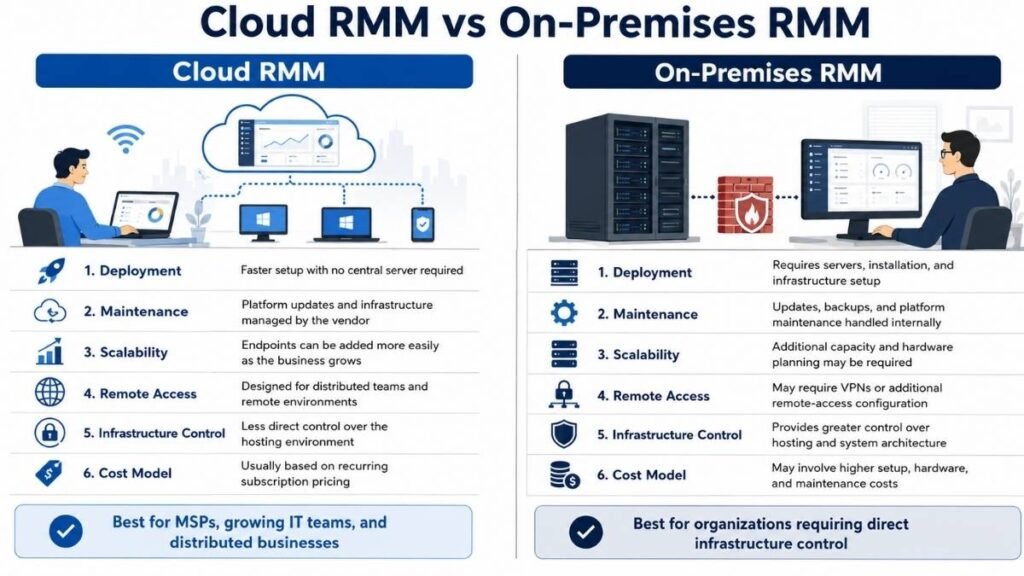
Neither deployment model is universally superior. The correct choice depends on operational requirements, security architecture, internal skills, budget, and regulatory obligations.
| Area | Cloud RMM | On-premises RMM |
| Initial deployment | Usually faster | Usually requires infrastructure setup |
| Central hardware | Maintained by provider | Maintained by customer |
| Updates | Usually managed by provider | Controlled by customer |
| Scalability | Generally easier | Requires internal capacity planning |
| Remote access | Designed for distributed access | May require additional configuration |
| Infrastructure control | Lower | Higher |
| Upfront cost | Usually lower | May require hardware and licenses |
| Ongoing cost | Recurring subscription | Infrastructure and maintenance costs |
| Data location | Depends on provider | Controlled by organization |
| Disaster recovery | Largely provider-managed | Customer-managed |
Cloud delivery is usually attractive to small and growing MSPs that do not want to maintain a separate RMM server. On-premises deployment may remain appropriate for organizations with strict hosting requirements, isolated networks, unusual integration needs, or an existing infrastructure team capable of maintaining the platform securely.
Do not make the decision based solely on the monthly subscription price. Include labor, infrastructure, backup, monitoring, maintenance, redundancy, upgrades, support, and security management in the total-cost calculation.
Cloud RMM Security Risks and Required Controls
RMM platforms require privileged access to endpoints. That access makes them operationally useful, but it also makes them attractive targets.
CISA has warned that legitimate RMM products can be abused by attackers because they provide remote access and may not automatically trigger antivirus or antimalware defenses.
Microsoft has also documented intrusions in which threat actors used legitimate RMM tools to maintain persistent access to compromised systems.
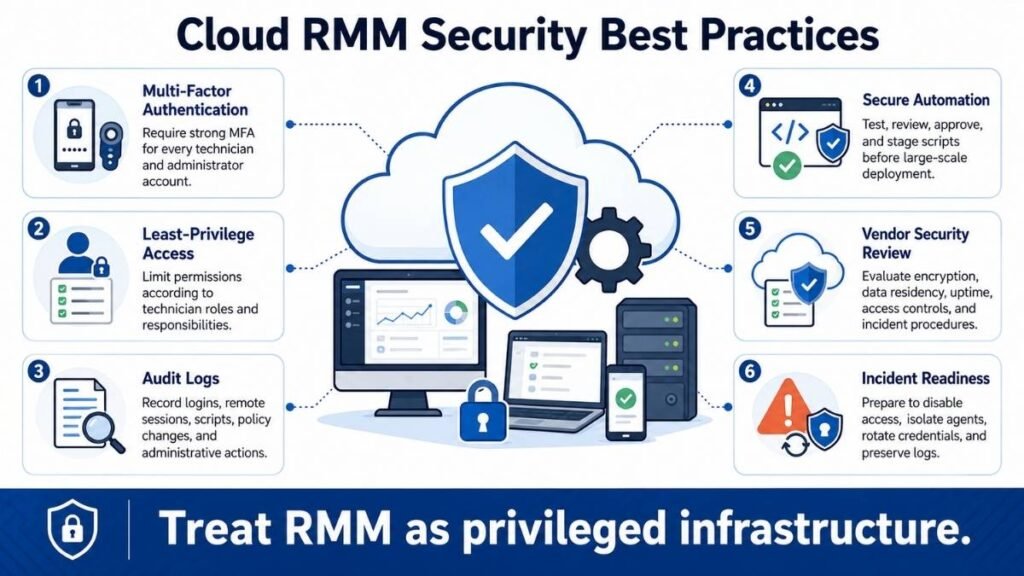
This does not mean organizations should avoid RMM. It means the platform must be treated as privileged security infrastructure.
Require phishing-resistant multifactor authentication
Every account with RMM access should use strong multifactor authentication. Where supported, phishing-resistant methods such as hardware security keys or passkeys are preferable to basic SMS verification.
Shared technician accounts should not be permitted.
Apply least-privilege access
A junior support technician may not need permission to modify security policies, deploy scripts globally, export credentials, or access every customer.
Use role-based access control to restrict each account to the minimum permissions required.
Protect administrator identities
Separate daily-use accounts from privileged administrative accounts. Conditional access policies should consider location, device trust, login risk, and unusual authentication activity.
Restrict remote sessions
Configure user consent where appropriate, record privileged sessions when legally and operationally acceptable, and prevent unauthorized file transfers or clipboard use.
Maintain detailed audit logs
The platform should record logins, policy changes, remote sessions, script execution, software deployment, credential access, and administrative actions.
Logs should be protected from alteration and retained long enough to support investigations.
Audit installed remote-access tools
Organizations should know which RMM and remote-access products are authorized. Unknown or duplicate tools may indicate shadow IT, poor vendor control, or malicious persistence.
CISA’s ransomware guidance recommends auditing remote access and RMM software present in the environment and identifying authorized tools.
Secure scripts and automation
Only approved staff should create or modify scripts. High-impact automation should require testing, peer review, staged deployment, and clear rollback procedures.
Review vendor security
Ask potential providers about:
- Independent security assessments
- Secure development practices
- Encryption
- Data residency
- Incident-notification procedures
- Backup and recovery
- Vulnerability disclosure
- Penetration testing
- Subprocessors
- Administrative access controls
- Service availability
- Log retention
- Customer data export
- Account recovery
A security certification alone does not prove that a platform is risk-free. It is one part of a broader vendor assessment.
Prepare an RMM incident-response plan
The organization should be able to revoke sessions, disable accounts, isolate agents, rotate credentials, preserve logs, notify customers, and contact the vendor during a suspected compromise.
Waiting until an incident begins to determine how to disable the platform is not an acceptable response plan.
How to Choose the Right Cloud RMM Software
Start with operational requirements, not vendor demonstrations.
A polished dashboard can look impressive while hiding weak patching, poor reporting, limited integrations, or confusing permissions.
Define the managed environment
Document:
- Number of endpoints
- Number of technicians
- Operating systems
- Server types
- Network devices
- Customer count
- Office locations
- Remote workforce
- Required integrations
- Compliance obligations
- Expected growth
- Existing support processes
A platform designed primarily for Windows workstations may not be suitable for an environment with significant macOS, Linux, mobile, cloud, or network infrastructure.
Compare the pricing model
RMM providers may charge:
- Per endpoint
- Per technician
- Per user
- Per customer
- Per site
- Per module
- Through a minimum monthly commitment
- Through a combined platform package
Per-technician pricing may suit a small technical team managing many endpoints. Per-endpoint pricing may be more predictable when endpoint counts are stable. Neither model is always cheaper.
Calculate the expected cost at the current endpoint count and at realistic 12-, 24-, and 36-month growth levels.
Also check whether remote access, patching, mobile-device management, ticketing, backup, reporting, antivirus management, and third-party integrations cost extra.
Run a structured trial
Do not test a platform on one clean laptop and assume the results will apply across the entire environment.
A useful proof of concept should include:
- Windows, macOS, and Linux devices used in production
- At least one server
- A remote or unreliable internet connection
- Patch deployment
- Alert tuning
- A failed automation job
- Remote support
- Role-based access testing
- Ticketing or PSA integration
- Agent removal and device offboarding
Record deployment time, technician effort, false alerts, endpoint performance impact, failed tasks, reporting limitations, and support response quality.
Test the exit process
Before signing a long contract, confirm how to:
- Export device and customer data
- Remove agents in bulk
- Recover scripts and documentation
- Cancel the subscription
- Retain audit logs
- Transfer integrations
- Delete provider-hosted data
A platform is easier to evaluate objectively when the organization knows it can leave without operational chaos.
Cloud RMM Platforms to Evaluate
The following examples are not a universal ranking. Each platform uses a different combination of pricing, endpoint support, automation, security, service management, and integrations.
| Platform | Notable positioning |
| NinjaOne | Cloud-native endpoint management with monitoring, patching, automation, and remote access |
| Atera | RMM, ticketing, patching, service desk, and automation with per-technician positioning |
| N-able N-sight | Unified endpoint management with RMM, ticketing, and billing capabilities |
| Datto RMM | Cloud-based RMM with endpoint management, automation, Microsoft 365 management, and Autotask PSA integration |
| Syncro | Combined RMM and PSA functionality for MSP workflows |
| MSP360 RMM | Endpoint monitoring and management for Windows, macOS, and Linux with per-admin positioning |
NinjaOne positions its platform as a cloud-native RMM capable of managing Windows, macOS, and Linux endpoints through centralized monitoring, patching, automation, and remote support.
Atera combines RMM with ticketing, patching, service-desk functions, and automation. Its current commercial positioning emphasizes a per-technician rather than purely per-device model.
N-able describes N-sight as unified endpoint management containing RMM, ticketing, billing, monitoring, patching, and automation capabilities.
Datto RMM is a cloud-based platform that includes remote management, automated patching, scripting, network visibility, Microsoft 365 management, and integration with Autotask PSA.
MSP360 currently positions its RMM product for Windows, macOS, and Linux management and offers a per-administrator plan supporting unlimited endpoints. Pricing and packaging can change, so buyers should verify the latest terms directly before making a decision.
Do not select a tool merely because it appears in the largest number of “best RMM” lists. Build a weighted scorecard around your own environment.
A practical scoring model could assign:
- 20% to monitoring and alert quality
- 15% to patch management
- 15% to automation
- 15% to security and access controls
- 10% to operating-system coverage
- 10% to integrations
- 5% to reporting
- 5% to support
- 5% to total cost
The scorecard should be completed by technicians who used the product during the trial, not only by management or procurement staff.
How to Implement Cloud RMM Successfully
Buying software does not produce proactive IT management by itself. Implementation quality determines whether the platform reduces workload or creates another noisy dashboard.
Begin with a controlled pilot
Deploy agents to a small group containing different device types and user profiles. Verify monitoring, updates, remote access, scripts, performance impact, and uninstall behavior.
Create standard device policies
Separate policies for:
- Workstations
- Laptops
- Servers
- Domain controllers
- Executive devices
- Point-of-sale systems
- Development systems
- Customer-specific infrastructure
A universal policy is easier to create but harder to operate safely.
Tune alerts before scaling
Start with conditions that require action. Review false positives every week and remove alerts that technicians consistently ignore.
An ignored alert is not useful monitoring.
Automate gradually
Begin with low-risk, reversible tasks. Collect evidence that each automation works reliably before expanding its scope.
For high-impact actions, use approval requirements or staged execution.
Document ownership
Assign responsibility for:
- Platform administration
- Security configuration
- Scripts
- Patch policies
- Integrations
- Customer onboarding
- Device offboarding
- Audit reviews
- Vendor communication
- Incident response
Without clear ownership, outdated policies and excessive privileges can remain unnoticed.
Measure operational outcomes
Track results such as:
- Time to detect incidents
- Time to resolve incidents
- Patch compliance
- Endpoint availability
- Tickets prevented through automation
- False-alert rate
- Technician hours saved
- Remote resolution rate
- Customer satisfaction
- Cost per managed endpoint
These measurements show whether the platform is improving service delivery rather than merely producing more data.
Frequently Asked Questions
What does RMM stand for?
RMM stands for remote monitoring and management. It refers to software used by MSPs and internal IT teams to remotely monitor, maintain, update, and support endpoints and IT infrastructure.
Is cloud-based RMM suitable only for MSPs?
No. MSPs frequently use RMM because they manage several customer environments, but internal IT departments can use the same technology to support employees, offices, servers, and remote devices.
Does RMM slow down computers?
A properly designed and configured agent should use limited resources, but performance varies by platform, device, policy, and active task. Monitoring, scanning, patching, and scripts should be tested on representative devices before large-scale deployment.
Can RMM replace an IT help desk?
RMM can prevent problems, generate alerts, and provide remote troubleshooting tools. A help desk or service-management process is still needed to handle user requests, communication, priorities, approvals, and service records.
Is cloud RMM secure?
It can be deployed securely, but no RMM platform is risk-free. Because it provides privileged remote capabilities, it should use strong multifactor authentication, least-privilege access, detailed logging, protected scripts, vendor security reviews, and a documented incident-response plan.
What is the difference between RMM and MDM?
RMM typically focuses on monitoring, maintaining, and supporting computers, servers, and other IT infrastructure. Mobile device management focuses on configuring, securing, and controlling mobile devices and their applications. Some modern platforms include both sets of capabilities.
What is the difference between RMM and network monitoring?
Network-monitoring tools focus primarily on the availability and performance of network devices, services, traffic, and connections. RMM usually provides broader endpoint administration, including patching, scripts, software inventory, remote access, and automated maintenance.
How much does cloud RMM cost?
Pricing depends on the provider and may be calculated per endpoint, technician, user, site, module, or package. Buyers should include implementation, training, integrations, security products, contract minimums, and future growth when calculating total cost.
Final Verdict
Cloud-based RMM can turn an IT operation from a reactive support model into a more proactive and scalable service.
The strongest platforms provide reliable monitoring, controlled patch deployment, secure remote access, useful automation, accurate inventory, clear reporting, and integrations that fit existing workflows.
The weakest deployments produce excessive alerts, broad administrator access, untested scripts, and recurring costs without measurable operational improvement.
Choose the platform through a structured trial rather than a feature-list comparison. Test it against real endpoints, real technicians, real security requirements, and realistic growth projections.
Most importantly, treat RMM as privileged infrastructure. Its ability to manage large numbers of devices is its greatest benefit and the primary reason its identities, permissions, agents, automation, and audit records must be protected carefully.