
Software is everywhere.
It powers your smartphone, runs your business, secures your data, and drives the global economy.
Whether you are a startup founder, a developer, a student, or a business executive, understanding software is no longer optional.
It is a survival skill in the digital age.
In this comprehensive guide, we will cover everything from what software actually is, to the best tools, development practices, and future trends shaping the industry.
Let’s dive in.
Table of Contents
1. What Is Software? A Clear Definition
2. Types of Software You Need to Know
3. How Software Development Works
4. Best Software Tools for Businesses in 2026
5. Cloud Software vs. On-Premise Software
6. Open-Source vs. Proprietary Software
7. AI-Powered Software: The Next Frontier
8. Software Security: Why It Matters More Than Ever
9. How to Choose the Right Software for Your Business
10. Software Pricing Models Explained
11. Top Software Development Languages in 2026
12. Future of Software: Trends to Watch
13. Final Thoughts
1. What Is Software? A Clear Definition
Software is a set of instructions, programs, or data that tells a computer what to do.
Unlike hardware the physical components of a device software is intangible.
You cannot touch it, but you can see its results every single day.
From the operating system on your laptop to the mobile app on your phone, software is the brain behind every digital device.
It translates human commands into machine language, enabling computers to perform complex tasks in milliseconds.
The term “software” was first used by mathematician John Tukey in 1958.
Since then, it has evolved into a trillion-dollar industry that continues to reshape civilization.
2. Types of Software You Need to Know
Not all software is created equal.
There are three primary categories that cover virtually every software product in existence.
2.1 System Software
System software manages the fundamental operations of a computer.
It acts as the bridge between hardware and application software.
Examples include: Windows, macOS, Linux, Android, iOS.
Without system software, your hardware is just an expensive piece of metal.
2.2 Application Software
Application software is what most people interact with on a daily basis.
It is designed to perform specific tasks for users.
Examples include: Microsoft Word, Adobe Photoshop, Slack, Zoom, Spotify.
Application software is where most of the innovation, competition, and CPC advertising spend happens.
2.3 Programming Software
Programming software gives developers the tools to write, test, and debug code.
This category includes compilers, debuggers, code editors, and integrated development environments (IDEs).
Examples include: Visual Studio Code, IntelliJ IDEA, Eclipse, Xcode.
2.4 Middleware
Middleware sits between system software and applications.
It enables communication and data management for distributed systems.
Examples include: database middleware, application server middleware, message-oriented middleware.
Enterprise businesses rely heavily on middleware to integrate multiple software systems seamlessly.
3. How Software Development Works
Software development is the process of designing, coding, testing, and maintaining software.
It is a disciplined engineering process that requires planning, creativity, and technical expertise.
3.1 The Software Development Life Cycle (SDLC)
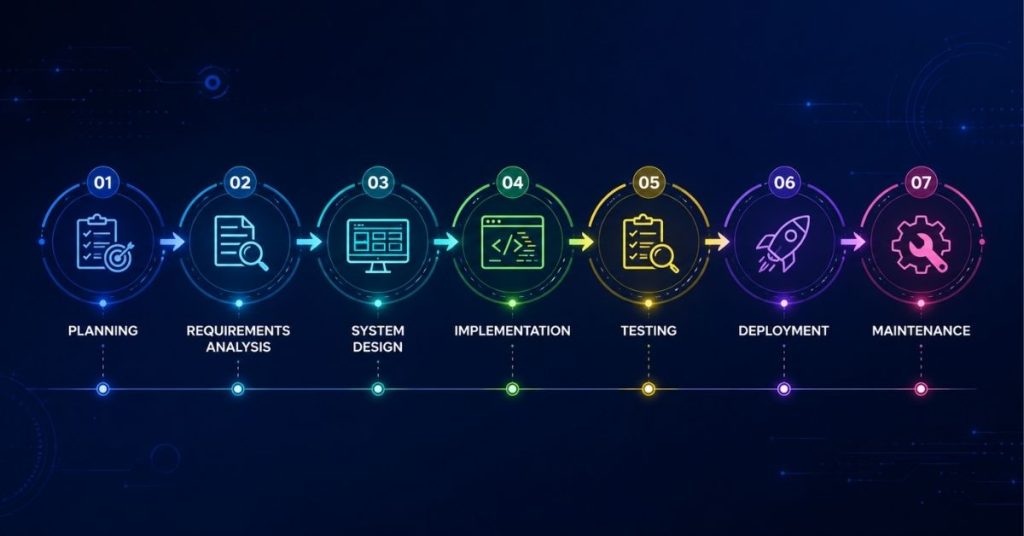
The SDLC is a structured framework that guides software development from concept to deployment.
It typically includes the following phases:
Phase 1: Planning
This is where the project scope, goals, timelines, and resources are defined.
A clear plan prevents costly mistakes later in development.
Phase 2: Requirements Analysis
Stakeholders and developers define exactly what the software must do.
Both functional and non-functional requirements are documented here.
Phase 3: System Design
The architecture of the software is designed in detail.
Database schemas, user interfaces, APIs, and security protocols are all mapped out.
Phase 4: Implementation (Coding)
This is where developers write the actual code.
Following coding standards and best practices is critical at this stage.
Phase 5: Testing
The software is rigorously tested for bugs, performance issues, and security vulnerabilities.
Types of testing include unit testing, integration testing, and user acceptance testing (UAT).
Phase 6: Deployment
The software is released to end users.
Deployment can be done in phases (rolling release) or all at once (big bang).
Phase 7: Maintenance
Post-launch, software requires ongoing updates, bug fixes, and improvements.
Maintenance can account for 60–80% of total software lifecycle costs.
3.2 Software Development Methodologies
Teams use different methodologies depending on project requirements.
Waterfall A linear, sequential approach best for projects with fixed requirements.
Agile An iterative approach that delivers working software in short sprints. Most popular today.
Scrum A framework within Agile that uses defined roles (Scrum Master, Product Owner) and sprint cycles.
DevOps Bridges development and operations teams to enable faster, more reliable releases.
Kanban A visual workflow system that limits work-in-progress and maximizes efficiency.
4. Best Software Tools for Businesses in 2026
Choosing the right software tools can make or break a business.
Here are the top categories and leading tools dominating the market in 2026.
4.1 Project Management Software
Asana Best for team collaboration and task tracking.
Monday.com Highly visual, great for non-technical teams.
Jira Industry standard for software development teams.
ClickUp All-in-one platform replacing multiple tools.
Trello Simple Kanban-style board for small teams.
4.2 Customer Relationship Management (CRM) Software
Salesforce The world’s #1 CRM with powerful automation and analytics.
HubSpot Best free-to-start CRM for small and medium businesses.
Zoho CRM Affordable with robust features for growing teams.
Pipedrive Sales-focused CRM with an intuitive pipeline view.
4.3 Accounting & Finance Software
QuickBooks The most popular accounting software for small businesses.
FreshBooks Ideal for freelancers and self-employed professionals.
Xero Cloud-based accounting is loved by accountants globally.
Wave Free accounting software for startups with basic needs.
4.4 Communication & Collaboration Software
Slack The go-to messaging platform for workplace teams.
Microsoft Teams Deep integration with Office 365 suite.
Zoom Video conferencing leader post-pandemic.
Google Meet Free and seamlessly integrated with Google Workspace.
4.5 Marketing Software
SEMrush The most comprehensive SEO and competitive intelligence platform.
Ahrefs Superior backlink analysis and keyword research tool.
Mailchimp Email marketing platform with automation and audience segmentation.
Hootsuite Social media management and scheduling at scale.
5. Cloud Software vs. On-Premise Software
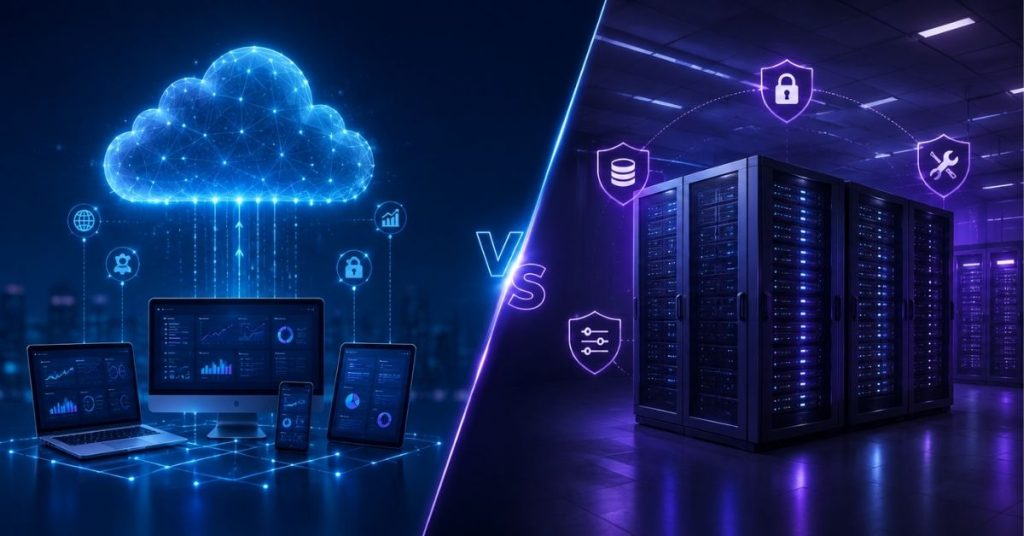
One of the biggest decisions businesses face is whether to use cloud-based or on-premise software.
Both have distinct advantages and trade-offs.
Cloud Software (SaaS)
Accessible from any device with an internet connection.
Lower upfront cost typically subscription-based.
Automatic updates and maintenance handled by the vendor.
Scales easily as your business grows.
Ideal for remote and distributed teams.
Examples: Salesforce, Google Workspace, Slack, Shopify.
On-Premise Software
Installed and run on your own servers and infrastructure.
Higher upfront cost but no ongoing subscription fees.
Full control over data, security, and customization.
Requires an in-house IT team for maintenance.
Preferred by enterprises with strict data compliance requirements.
Examples: SAP ERP, Microsoft Dynamics (on-prem), Oracle Database.
The market is clearly moving toward cloud.
Gartner predicts that by 2027, over 80% of enterprise software spending will be cloud-based.
However, industries like healthcare, finance, and government often still prefer on-premise for compliance reasons.
6. Open-Source vs. Proprietary Software
This is one of the most important distinctions in the software world.
Open-Source Software
The source code is publicly available for anyone to view, modify, and distribute.
Free to use, though enterprise support may cost money.
Large community of developers contributing to improvements.
Examples: Linux, WordPress, MySQL, Python, Kubernetes.
Ideal for developers and organizations that want flexibility and control.
Proprietary Software
The source code is owned by a company and not publicly accessible.
Requires purchasing a license to use.
Professional support and guaranteed updates from the vendor.
Examples: Microsoft Windows, Adobe Photoshop, AutoCAD, QuickBooks.
Best for organizations that need vendor accountability and polished support.
Many modern businesses use a hybrid approach of open-source infrastructure with proprietary applications on top.
7. AI-Powered Software: The Next Frontier
Artificial Intelligence is fundamentally changing what software can do.
In 2026, AI is not just a feature, it is the backbone of the most competitive software products.
Natural Language Processing (NLP)
NLP allows software to understand and generate human language.
Applications: chatbots, virtual assistants, sentiment analysis, language translation.
Leading tools: OpenAI GPT-4, Google Gemini, Anthropic Claude.
Machine Learning Platforms
ML platforms allow organizations to build predictive models without deep AI expertise.
They power recommendations, fraud detection, demand forecasting, and personalization.
Leading tools: Google Vertex AI, AWS SageMaker, Azure Machine Learning, Databricks.
Generative AI in Software Development
Generative AI is transforming how developers write code.
GitHub Copilot, Cursor, and Tabnine now assist developers in real-time.
Studies show AI coding assistants can boost developer productivity by 40–55%.
This is reshaping hiring, project timelines, and software quality benchmarks.
AI in Business Software
CRM tools like Salesforce Einstein AI predict which leads will convert.
Marketing tools use AI to personalize email campaigns at scale.
Finance software uses AI to detect fraud and automate reconciliation.
HR software leverages AI to rank resumes and reduce hiring bias.
8. Software Security: Why It Matters More Than Ever
Cybercrime is projected to cost the world $10.5 trillion annually by 2026.
Most of those attacks target vulnerabilities in software.
Security is no longer an afterthought; it must be built into software from day one.
Common Software Security Threats
SQL Injection Attackers insert malicious code into database queries.
Cross-Site Scripting (XSS) Malicious scripts injected into trusted websites.
Buffer Overflow Sending too much data to a program to overwrite memory.
Zero-Day Exploits Vulnerabilities unknown to the vendor, exploited before a patch exists.
Ransomware Malicious software that encrypts data and demands payment for decryption.
Software Security Best Practices
Adopt a Secure Software Development Life Cycle (SSDLC).
Conduct regular penetration testing and vulnerability assessments.
Implement multi-factor authentication (MFA) for all software access points.
Keep all libraries, frameworks, and dependencies updated.
Use encryption for data in transit and data at rest.
Following the principle of least privilege users should have only the access they need.
9. How to Choose the Right Software for Your Business
With thousands of software products on the market, choosing the right one is critical.
A wrong choice wastes money, time, and team morale.
Here is a step-by-step framework to make the right decision.
Step 1: Define Your Requirements
What problem are you solving?
Who will use the software?
What integrations do you need?
Write down your must-have features vs. nice-to-have features.
Step 2: Set a Budget
Include not just licensing costs but also implementation, training, and maintenance.
Hidden costs are common in enterprise software and always ask for a full total cost of ownership (TCO).
Step 3: Evaluate Vendors
Research reviews on G2, Capterra, and Gartner Peer Insights.
Request product demos and free trials before committing.
Check vendor financial stability if you don’t want a key vendor to go out of business.
Step 4: Assess Scalability
Will this software grow with your business?
Can it handle 10x your current volume in two years?
Choosing software that you outgrow in 18 months is a costly mistake.
Step 5: Check Security and Compliance
Does the software meet industry standards such as ISO 27001, SOC 2, GDPR, or HIPAA?
Is customer data encrypted and regularly backed up?
Who owns the data, you or the vendor?
10. Software Pricing Models Explained
Software pricing has evolved significantly over the past decade.
Understanding pricing models helps you avoid overspending and negotiate better deals.
Per-User (Per-Seat) Pricing
You pay a fixed fee per user per month or year.
Common for SaaS tools like Slack, Salesforce, and HubSpot.
Best for small-to-medium teams with predictable headcount.
Usage-Based Pricing
You pay for what you use API calls, transactions, data storage, etc.
Common for cloud infrastructure providers like AWS, Google Cloud, and Azure.
Scales down when demand is low, but can spike unexpectedly.
Flat-Rate (Subscription) Pricing
One price covers everything regardless of usage or users.
Simple to budget and easy to understand.
Less common now but still used by some all-in-one tools.
Freemium Model
Core features are free; premium features require payment.
Popular for consumer software and tools targeting individual users before enterprise teams.
Examples: Notion, Trello, Zoom, Dropbox.
Perpetual License
A one-time payment that gives you the right to use the software forever.
Updates may require additional payment.
Common in legacy on-premise software.
11. Top Software Development Languages in 2026
The programming language you choose has a massive impact on software performance, scalability, and talent availability.
Python
The #1 language for AI, machine learning, and data science.
Also widely used for web development, automation, and scripting.
Beginner-friendly syntax with an enormous library ecosystem.
JavaScript / TypeScript
The dominant language for web development is both frontend and backend (Node.js).
TypeScript adds static typing, making large codebases much easier to manage.
Frameworks: React, Angular, Vue, Next.js, Express.
Java
Enterprise-grade, platform-independent, and battle-tested for decades.
Widely used in banking, insurance, and large-scale backend systems.
Strong performance with the JVM and a massive developer community.
Rust
The fastest-growing systems programming language known for memory safety.
Preferred for performance-critical applications like game engines, browsers, and embedded systems.
Voted most loved programming language in the Stack Overflow survey for 9 consecutive years.
Go (Golang)
Designed by Google for building scalable, concurrent backend services.
Extremely fast compile times and clean, simple syntax.
Used by Uber, Dropbox, Docker, and Kubernetes.
Swift
Apple’s official language for iOS, macOS, and watchOS app development.
Modern, safe, and significantly faster than its predecessor Objective-C.
12. Future of Software: Trends to Watch
The software industry never stands still.
Here are the biggest trends that will define software development and adoption in the coming years.
Low-Code / No-Code Platforms
These platforms allow non-developers to build functional software applications through visual interfaces.
Market leaders: Bubble, Webflow, Airtable, Microsoft Power Apps, Appsmith.
By 2026, 65% of enterprise applications will be built using low-code tools.
Serverless Architecture
Developers deploy code without managing server infrastructure.
The cloud provider handles scaling, patching, and capacity automatically.
Reduces operational overhead and lowers cost at low traffic levels.
Key platforms: AWS Lambda, Google Cloud Functions, Azure Functions.
Edge Computing
Processing data at the edge of the network closer to the user rather than in centralized data centers.
Reduces latency dramatically, critical for IoT, AR/VR, and real-time applications.
Quantum Computing Software
Still in early stages, quantum computing promises to solve problems impossible for classical computers.
Industries like pharmaceuticals, logistics, and finance are watching this space closely.
Major players: IBM Quantum, Google Quantum AI, Microsoft Azure Quantum.
Green Software Engineering
As data centers consume massive amounts of energy, the industry is shifting toward sustainable software practices.
Developers are now optimizing code not just for speed, but for energy efficiency.
The Green Software Foundation is leading efforts to standardize eco-friendly software metrics.
13. Final Thoughts
Software is not just a tool it is the foundation of the modern world.
Every business that wants to stay competitive must take software seriously.
Whether you are building software, buying it, or managing a team that uses it a deep understanding of the landscape gives you a strategic edge.
The best software:
Solves a real problem.
Scales with your needs.
Stays secure and compliant.
Delivers measurable ROI.
As AI, cloud, and low-code continue to democratize software development, the barrier to entry keeps falling.
But so does the margin for error.
Choosing the wrong software, ignoring security, or failing to adapt to new trends can derail even the best business.
Stay informed. Stay adaptable. And always let data not hype drive your software decisions.
Frequently Asked Questions (FAQ)
Q1: What is software in simple terms?
Software is a set of instructions that tells a computer what to do. It includes everything from operating systems and mobile apps to business tools and games.
Q2: What is the difference between software and hardware?
Hardware refers to the physical components of a computer (processor, RAM, storage). Software is the intangible set of instructions that runs on that hardware.
Q3: What are the main types of software?
The three main types are system software (OS, drivers), application software (apps, tools), and programming software (IDEs, compilers).
Q4: What is SaaS software?
SaaS (Software as a Service) is cloud-based software delivered via subscription. Users access it through a web browser without installing anything locally. Examples: Google Workspace, Salesforce, Zoom.
Q5: What programming language should I learn first?
Python is the most recommended first programming language due to its simple syntax, versatility, and strong job market demand especially in AI and data science.
Q6: How do I keep my software secure?
Keep all software updated, use strong passwords and MFA, limit user access permissions, conduct regular security audits, and use encryption for sensitive data.
Q7: Is open-source software safe to use?
Generally yes, especially widely-used projects maintained by large communities. However, always vet open-source libraries you include in production software for known vulnerabilities.