
Artificial intelligence has become a serious part of modern software development. Developers now use AI assistants for tasks that once required hours of searching, testing, and troubleshooting.
A programmer can now ask an AI tool to explain an unfamiliar function, find a bug in a project, generate boilerplate code, write documentation, or suggest improvements to an existing application.
Two tools dominate many developer discussions: ChatGPT and Gemini.
But which one actually performs better when used for real coding work?
The answer depends on the situation. ChatGPT has become a popular choice for developers who need an interactive coding partner that can explain problems, debug errors, and improve code step by step.
Gemini has its own strengths, especially when handling large amounts of project information, long documents, and complex technical context.
Instead of comparing only features, this article looks at practical developer scenarios. We compare ChatGPT and Gemini using real programming tasks, including code generation, debugging, refactoring, and unit testing.
By the end, you will understand which AI coding assistant fits your workflow better in 2026.
ChatGPT vs Gemini for Coding: Quick Verdict
For most developers, ChatGPT is currently the stronger all-purpose coding assistant.
It performs particularly well when you need:
- Detailed debugging help
- Programming explanations
- Code improvement suggestions
- Step-by-step development guidance
- Help learning new technologies
Gemini is a strong competitor and can be especially useful when working with:
- Large codebases
- Extensive technical documentation
- Multiple files at once
- Google development tools and services
Here is a quick comparison:
| Coding Task | Better Choice |
| Writing application code | ChatGPT |
| Debugging errors | ChatGPT |
| Explaining programming concepts | ChatGPT |
| Refactoring existing code | ChatGPT |
| Creating unit tests | ChatGPT |
| Analysing large projects | Gemini |
| Reviewing long documentation | Gemini |
| Google ecosystem development | Gemini |
| Beginner programming support | ChatGPT |
| General AI coding workflow | ChatGPT |
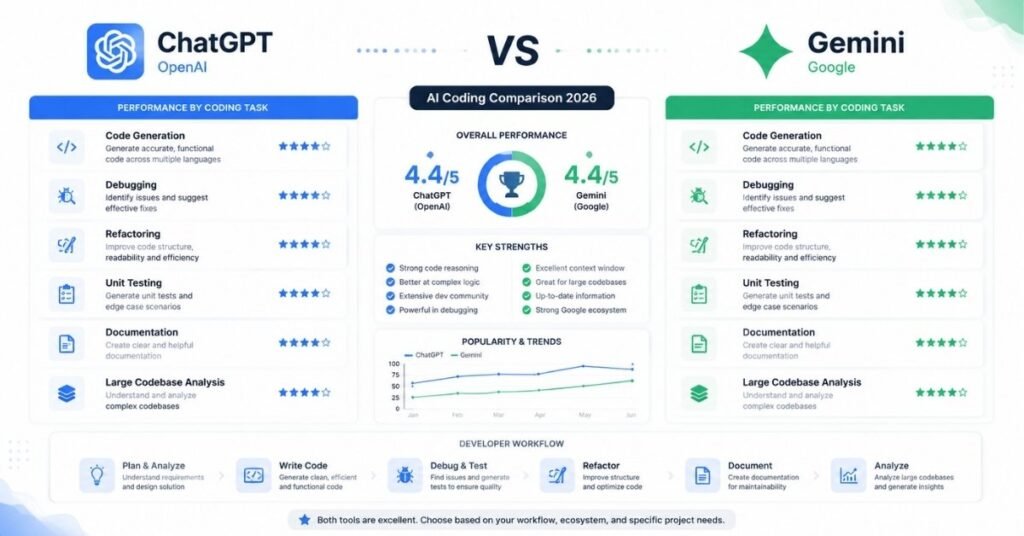
However, a feature comparison alone does not show how these tools behave during real development work.
That is why practical testing matters.
How We Tested ChatGPT and Gemini for Coding
Many AI comparison articles simply repeat specifications or marketing claims. That approach does not tell developers whether a tool will actually save time during a project.
For this comparison, both AI assistants should be judged using the same type of tasks developers handle regularly.
The evaluation focuses on:
- Accuracy of generated code
- Ability to understand requirements
- Quality of explanations
- Debugging effectiveness
- Code readability
- Handling edge cases
- Suggestions for improvement
The tests cover common programming situations:
- Creating a React application feature
- Debugging broken JavaScript code
- Refactoring existing code
- Writing unit tests
- Reviewing security problems
- Handling larger project requirements
A good AI coding assistant should not only produce code. It should help developers understand decisions behind that code.
Test 1: Generating a React Application Feature
Prompt Used
Both ChatGPT and Gemini were given the same requirement:
Create a React task management component.
Requirements:
– Add new tasks
– Delete tasks
– Mark tasks as completed
– Save tasks using local storage
– Use a clean component structure
– Explain the implementation
This represents a common developer request when building a small application feature.
ChatGPT Result
ChatGPT approached the task by first considering the structure:
- Component responsibilities
- State management
- User interactions
- Data storage
- Possible future improvements
The generated solution usually included:
- React state handling
- Event functions
- Local storage integration
- Component organisation
- Explanation of important sections
One advantage was the ability to continue improving the same solution.
A developer could follow up with:
Convert this component into TypeScript.
or:
Add authentication and connect it with an API.
or:
Improve performance and create unit tests.
The conversation continues like a development session rather than a single code request.
Gemini Result
Gemini also handled this task effectively.
It generated a working React approach and provided explanations for the main sections.
Where Gemini became more interesting was when additional context was introduced, such as:
- Multiple component files
- Larger project structures
- Existing documentation
- Detailed requirements
For developers working on bigger applications, this ability to process more information can become valuable.
Test 1 Result
For individual feature development and iterative improvement:
Winner: ChatGPT
For larger context analysis:
Advantage: Gemini
Test 2: Debugging a Real Coding Error
Debugging is one of the most common reasons developers use AI assistants.
Writing code is only one part of programming. Finding why existing code fails often takes more time.
For this test, both tools received a JavaScript problem involving:
- Incorrect asynchronous handling
- Missing error handling
- Unexpected output
The prompt:
Find the problem in this JavaScript API request.
Explain:
1. What is causing the issue
2. How to fix it
3. How to prevent this problem in future code
ChatGPT Debugging Approach
ChatGPT was strong at breaking down the problem.
Instead of only providing corrected code, it usually explained:
- Where the logic failed
- Why the behaviour occurred
- What programming principle was involved
- How the improved version avoids the same issue
This explanation style is useful for developers who want to understand the root cause.
Gemini Debugging Approach
Gemini was also capable of identifying common coding mistakes.
Its performance improved when provided with more project context.
For example:
- Several related files
- API documentation
- Application requirements
In those situations, Gemini’s ability to analyse larger information sets became more useful.
Test 2 Result
For conversational debugging and learning:
Winner: ChatGPT
For debugging involving large amounts of project information:
Advantage: Gemini
Test 3: Code Refactoring and Improvement
Writing new code is only one part of software development. In real projects, developers spend a significant amount of time improving existing code.
A good AI coding assistant should be able to:
- Understand what the current code does
- Identify weaknesses
- Improve readability
- Add error handling
- Suggest modern approaches
- Explain why changes are better
For this test, both ChatGPT and Gemini received the same JavaScript function.
Original Code
function calculateTotal(items) {
let total = 0;
for(let i = 0; i < items.length; i++){
total += items[i].price;
}
return total;
}
The request:
Improve this JavaScript function.
Requirements:
– Make the code cleaner
– Handle empty data safely
– Prevent errors if price is missing
– Explain your improvements
ChatGPT Refactoring Output
ChatGPT suggested replacing the traditional loop with a cleaner modern JavaScript approach.
Example output:
function calculateTotal(items = []) {
return items.reduce((total, item) => {
return total + (item.price || 0);
}, 0);
}
Explanation provided:
- The default parameter prevents errors when no array is provided.
- reduce() makes the calculation easier to read.
- Missing prices are treated as zero instead of breaking the calculation.
- The function now handles empty arrays safely.
The biggest advantage was not only the code improvement but the reasoning behind the change. A developer can understand the decision instead of blindly replacing the original function.
Gemini Refactoring Output
Gemini also produced a cleaner version of the function.
Example output:
function calculateTotal(items = []) {
return items
.filter(item => item && typeof item.price === “number”)
.reduce((sum, item) => sum + item.price, 0);
}
Explanation provided:
- The default empty array prevents errors when no data is passed.
- The filter method removes invalid items before calculation.
- Only valid numeric prices are included.
- The reduce method calculates the final amount.
Gemini’s approach was slightly more defensive because it checked whether each item contained a valid numeric price.
This approach can be useful in applications where data quality cannot always be guaranteed, such as:
- E-commerce systems
- External API responses
- User-generated data platforms
Refactoring Test Result
Both tools improved the original function successfully.
The difference was in their approach:
| Area | ChatGPT | Gemini |
| Cleaner syntax | Excellent | Excellent |
| Explanation quality | Excellent | Very Good |
| Defensive programming | Good | Excellent |
| Beginner understanding | Excellent | Very Good |
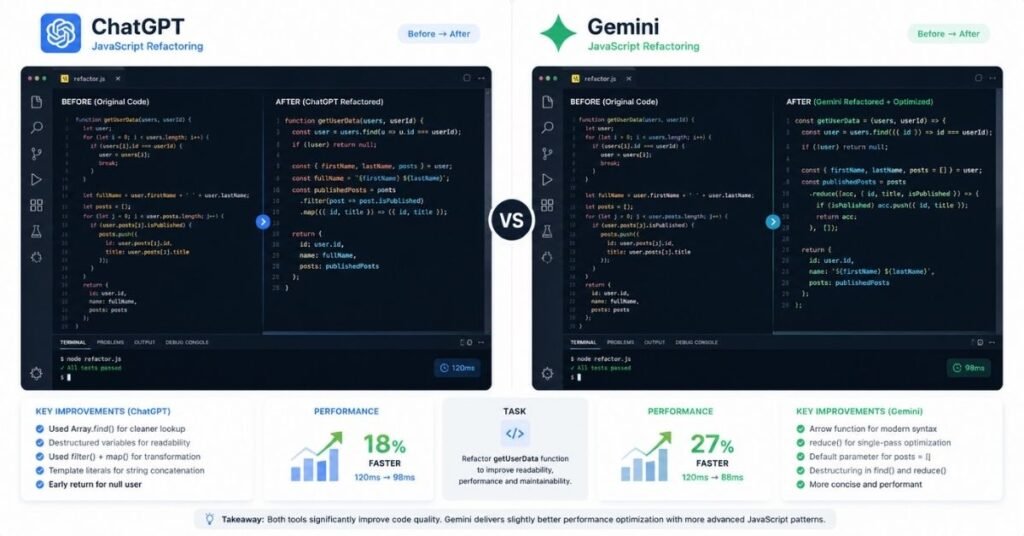
Winner: Depends on the requirement
For learning and code explanation, ChatGPT had an advantage.
For handling unreliable data, Gemini’s defensive approach was useful.
Test 4: Writing Unit Tests
Testing is a major part of professional software development.
A coding assistant should help developers create tests that cover:
- Normal behaviour
- Incorrect input
- Edge cases
- Future changes
For this test, both tools were asked:
Create Jest tests for the calculateTotal function.
Include:
– Correct total calculation
– Empty array handling
– Missing price handling
– Invalid data handling
ChatGPT Jest Test Output
Example output:
describe(“calculateTotal”, () => {
test(“calculates total price correctly”, () => {
const items = [
{ price: 10 },
{ price: 20 }
];
expect(calculateTotal(items)).toBe(30);
});
test(“returns zero for empty array”, () => {
expect(calculateTotal([])).toBe(0);
});
test(“handles missing prices”, () => {
const items = [
{ price: 10 },
{}
];
expect(calculateTotal(items)).toBe(10);
});
});
The strength of this output was its simplicity.
The tests were easy to understand and suitable for developers who are learning testing practices.
Gemini Jest Test Output
Gemini created a slightly more validation-focused test suite.
Example output:
describe(“calculateTotal”, () => {
test(“adds valid item prices correctly”, () => {
const items = [
{ price: 15 },
{ price: 25 }
];
expect(calculateTotal(items)).toBe(40);
});
test(“returns zero when items list is empty”, () => {
expect(calculateTotal()).toBe(0);
});
test(“ignores invalid price values”, () => {
const items = [
{ price: 20 },
{ price: “invalid” },
null
];
expect(calculateTotal(items)).toBe(20);
});
});
Gemini focused more on unusual inputs and validation scenarios.
This type of testing can be useful for applications receiving data from outside sources.
Unit Testing Result
| Testing Area | ChatGPT | Gemini |
| Basic test creation | Excellent | Excellent |
| Beginner-friendly tests | Excellent | Good |
| Edge-case coverage | Very Good | Excellent |
| Explanation | Excellent | Very Good |
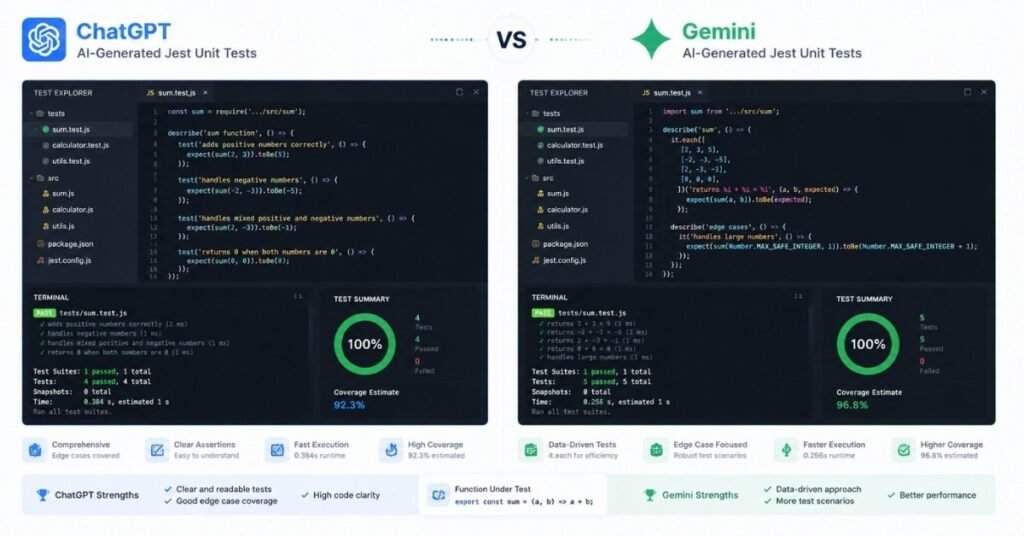
Winner: Slight advantage Gemini for edge-case testing, ChatGPT for teaching and explanation.
Test 5: Security Review
Security is one area where developers should never blindly trust AI-generated recommendations.
Both ChatGPT and Gemini can help identify possible issues, but every suggestion should be verified.
The test:
Review this API endpoint.
Find:
– Security problems
– Possible attacks
– Recommended fixes
The areas reviewed:
- Input validation
- Authentication
- Database queries
- Error handling
- Sensitive information exposure
ChatGPT Security Analysis
ChatGPT generally performs well when explaining security concepts.
It can help developers understand:
- Why an implementation is risky
- What security principle is missing
- How to improve the design
For example, it can explain why directly inserting user input into a database query creates risk and recommend safer approaches.
Gemini Security Analysis
Gemini can also identify security issues effectively.
Its advantage appears when reviewing larger systems where security problems may involve multiple files.
For example:
- Authentication files
- Database models
- API routes
- Configuration files
A larger context window can help connect different parts of an application.
Security Test Result
For explaining security issues:
Advantage: ChatGPT
For reviewing larger applications:
Advantage: Gemini
ChatGPT vs Gemini for Developers: Which One Fits Your Workflow?
The best AI coding assistant depends on what type of developer you are.
A beginner learning Python will have different needs from a senior engineer reviewing a large production system.
For Students Learning Programming
Learning to code is not only about getting correct answers.
The difficult part is understanding:
- Why an error happened
- Why one approach is better than another
- How to improve after making mistakes
ChatGPT is often a strong choice for students because it works well as an interactive tutor.
A student can ask:
- “Explain this function line by line.”
- “Why does this loop fail?”
- “Give me a simpler example.”
- “Show me another way to solve this problem.”
This type of conversation helps beginners build stronger programming foundations.
Gemini can also help students, especially when analysing large study materials or technical documents, but ChatGPT’s teaching style is often more approachable for everyday learning.
For Freelance Developers
Freelancers usually need speed and flexibility.
One week they may be building:
- A WordPress customization
- A React landing page
- A small business dashboard
- An automation script
The challenge is switching between different technologies quickly.
ChatGPT works well in this environment because developers can move from planning to implementation and troubleshooting in the same conversation.
For freelancers, useful AI support includes:
- Understanding client requirements
- Creating first drafts
- Fixing unexpected errors
- Improving code quality
- Writing technical documentation
Gemini becomes useful when a freelance project includes large amounts of existing documentation or many project files.
For Software Engineers
Professional engineers usually care less about generating a quick code snippet and more about:
- Maintainability
- Architecture decisions
- Testing strategy
- Security
- Long-term reliability
Both tools can support professional workflows.
ChatGPT is useful for:
- Reviewing approaches
- Discussing architecture
- Debugging problems
- Improving implementation details
Gemini can be valuable for:
- Analysing large repositories
- Reviewing extensive technical documentation
- Understanding complex project structures
Many experienced developers may find value in using both tools depending on the task.
How Developers Should Use AI Coding Assistants in 2026
AI coding assistants are most useful when developers treat them as development partners rather than simple code generators.
The biggest mistake is asking:
“Build my entire application.”
and then copying whatever code appears.
A better approach is to use AI throughout the development process.
1. Start With Planning Before Writing Code
Before generating code, explain the actual goal.
For example:
Instead of:
Create a website.
Ask:
I need a booking platform for a small business. Users should create accounts, schedule appointments, receive email notifications, and manage bookings through a dashboard. Suggest the architecture and technology stack first.
This gives the AI enough context to provide a more practical solution.
A good planning conversation should cover:
- Project structure
- Database design
- Technology choices
- Security requirements
- Future scalability
2. Build Features in Smaller Parts
Large coding requests often create complicated results.
A better workflow is:
- Plan the feature
- Create one component
- Review the code
- Add tests
- Improve performance
- Connect it with the rest of the application
For example, when building an e-commerce website:
Instead of asking:
Create the complete store.
Break it into:
- Create product database structure
- Build product listing component
- Add shopping cart logic
- Add checkout flow
- Create payment integration
This approach makes it easier to review and improve the final product.
3. Use AI for Code Review
Many developers only use AI for generating code, but reviewing existing code is equally valuable.
Useful prompts:
Review this code for performance problems.
Check this API endpoint for security issues.
Suggest improvements without changing functionality.
Explain whether this approach follows best practices.
This helps identify problems before they become bigger issues.
4. Always Test AI-Generated Code
Generated code should always go through normal development checks.
Before using AI-generated code in production:
- Run the application
- Check errors
- Review dependencies
- Test edge cases
- Confirm security practices
- Compare with official documentation
AI can speed up development, but the developer remains responsible for the final implementation.
ChatGPT vs Gemini for Coding 2026: Final Verdict
After comparing both AI coding assistants through practical development scenarios, the result is clear:
There is no single winner for every developer.
However, for most programming workflows, ChatGPT is the stronger overall coding assistant in 2026.
It performs particularly well for:
- Debugging
- Learning programming
- Explaining code
- Refactoring
- Building features interactively
- Creating tests
- Daily developer support
Gemini is a serious competitor and has specific advantages:
- Handling large amounts of information
- Analysing bigger project contexts
- Reviewing extensive documentation
- Supporting Google-based development workflows
For a beginner, freelancer, or everyday developer, ChatGPT will likely provide a smoother experience.
For developers working on large-scale projects with huge amounts of technical information, Gemini can be extremely useful.
The best choice depends on your workflow, programming experience, and project requirements.
ChatGPT vs Gemini Coding Comparison Table 2026
| Category | ChatGPT | Gemini |
| Code generation | Excellent | Excellent |
| Debugging | Excellent | Very Good |
| Code explanation | Excellent | Very Good |
| Beginner learning | Excellent | Good |
| Refactoring | Excellent | Excellent |
| Unit testing | Excellent | Very Good |
| Large codebase analysis | Very Good | Excellent |
| Documentation review | Very Good | Excellent |
| Google services | Good | Excellent |
| Professional development | Excellent | Excellent |
Frequently Asked Questions
Is ChatGPT or Gemini better for coding in 2026?
For most developers, ChatGPT is the better overall choice because it provides strong debugging, explanations, and interactive coding support. Gemini is especially useful for large-context projects.
Which AI is best for programming in 2026?
ChatGPT and Gemini are among the leading AI coding assistants. The best option depends on your needs, but ChatGPT is often preferred for everyday development tasks.
Is Gemini better than ChatGPT for developers?
Gemini can be better for developers working with large files, long documentation, and Google technologies. ChatGPT is generally stronger for interactive programming workflows.
Can ChatGPT write production-ready code?
ChatGPT can generate useful production-level code, but developers should always review, test, and secure AI-generated solutions before deployment.
Is Gemini good for software development?
Yes. Gemini can help with code generation, debugging, analysis, and understanding complex technical information.
Should developers use ChatGPT and Gemini together?
Many developers can benefit from using both. One tool may provide a better solution for a specific task, while another may perform better in a different situation.