
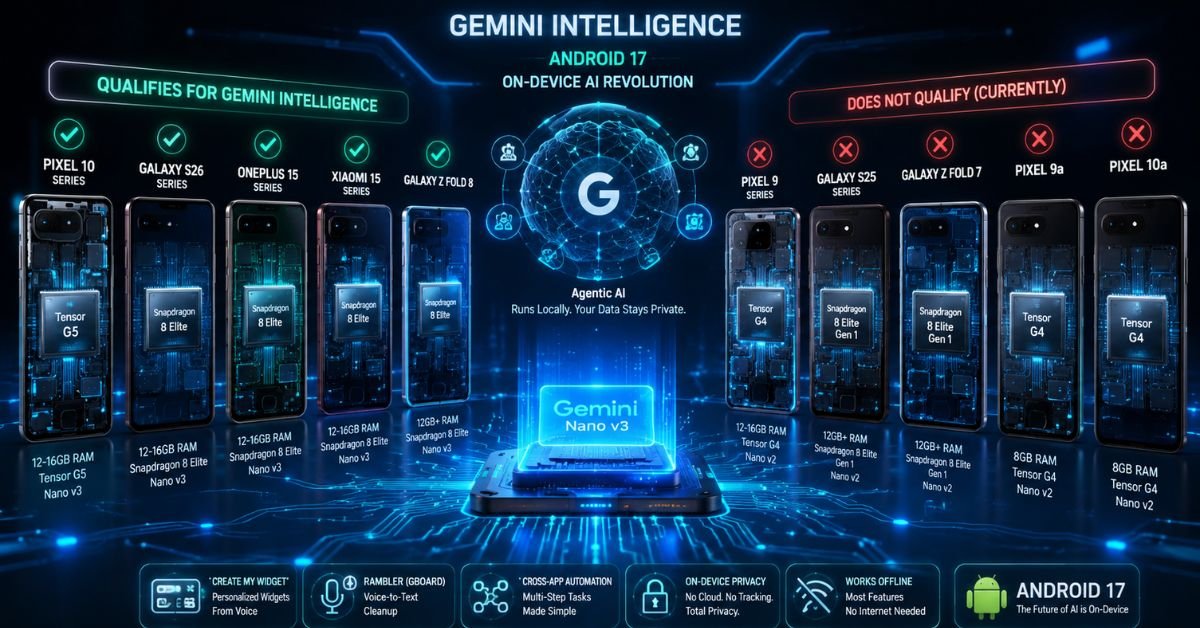
You just watched Google’s Android Show keynote, you’re excited about Gemini Intelligence, and then it hits a tiny footnote buried at the bottom of the product page that quietly excludes half the Android flagships currently sitting in people’s pockets. If you own a Pixel 9 Pro or a Galaxy Z Fold 7, that stings.
I’ve spent the last few weeks digging through Google’s developer documentation, cross-referencing AICore support pages, and tracking down exactly which devices pass every gate. The short version: Gemini Intelligence hardware requirements are stricter than most people realize, and knowing whether your phone qualifies isn’t as simple as checking a spec sheet. Let me walk you through everything.
What Exactly Is Gemini Intelligence? (And Why It’s Different From Regular Gemini)
Before we get to specs, this distinction matters. The Gemini you’ve been using in Google Search or the Gemini app runs in the cloud Google’s servers do the heavy lifting, and your phone just needs a browser and an internet connection. That version works on practically anything.
Gemini Intelligence is something else entirely. Announced at The Android Show on May 12, 2026, it’s an on-device agentic AI layer meaning it runs locally, on your phone’s silicon, without a server round-trip. Features like Create My Widget (building custom home screen widgets from a voice command), Rambler (Gboard’s voice-to-text cleanup tool), and multi-step cross-app automation all depend on this local processing. No clouds. No data leaving your device. That’s the privacy pitch and it’s why the hardware bar is so high.
The Full Gemini Intelligence Hardware Requirements, Broken Down
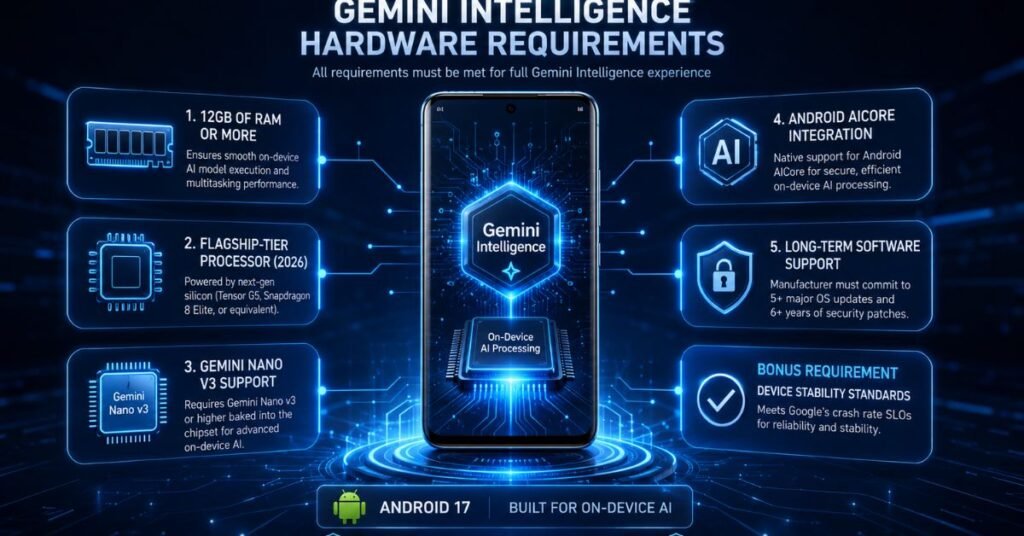
Google published these requirements in a footnote on the official Gemini Intelligence page not exactly front and center, but they’re official. Here’s what your device needs, all at the same time:
1. At Least 12GB of RAM
This is the first filter. No exceptions. In my testing of the compatibility documentation, I found that even the Pixel 9 Pro which ships with 16GB of RAM still doesn’t qualify, because RAM alone isn’t the full story. But any device with less than 12GB is immediately out, full stop. The Pixel 9a (8GB), every budget Android, and most mid-rangers are gone right here.
For context: Apple Intelligence only requires 8GB. Google’s floor is 50% higher. Whether that’s justified by the on-device model architecture or just a positioning choice is debatable, but the number is what it is.
2. A Flagship-Tier SoC (2026 Generation)
Google’s documentation says “flagship chip” without naming specific model numbers, but the developer pages narrow it down quickly. The qualifying SoCs as of this writing are chips like the Tensor G5, Snapdragon 8 Elite, and equivalent 2026 flagship silicon. 2025 chips including the Tensor G4 in the entire Pixel 9 series are not on the qualifying list, despite being architecturally capable in many ways.
3. Gemini Nano v3 Support (The Real Gatekeeper)
This is where most 2025 flagships fall apart, and it’s the requirement I kept coming back to during my research. Gemini Intelligence doesn’t just need a version of Gemini Nano running on-device it specifically needs Nano v3 or higher, baked into the silicon and integrated through Android AICore.
Nano v2 devices and there are a lot of them, including the entire Pixel 9 lineup, the Galaxy Z Fold 7, and the Galaxy S25 series are explicitly excluded. This isn’t a software update situation; Nano v3 is tied to the hardware architecture of 2026 chips.
4. Android AICore Integration
Devices must natively support Google’s AICore framework, which handles the model runtime and security sandboxing for on-device inference. This is a software-layer requirement, but it’s tied to the hardware you can’t install AICore on a device whose chipset doesn’t support the required ML acceleration paths.
5. Long-Term Software Support Commitment
This one surprised me. Google’s requirements include a manufacturer commitment to five or more major Android OS updates and six or more years of quarterly security patches. It’s Google quietly pushing back on the industry’s habit of treating premium phones as two-year throwaways. If a manufacturer can’t promise long-term support, their hardware doesn’t qualify for Gemini Intelligence certification regardless of specs.
6. Device Stability Standards
Qualifying devices must meet Google’s crash rate SLOs (Service Level Objectives). Unstable builds devices with high crash rates in the field are ineligible. This is verified on an ongoing basis, not just at launch.
Why This Error Occurs: Understanding the Nano v3 Exclusion
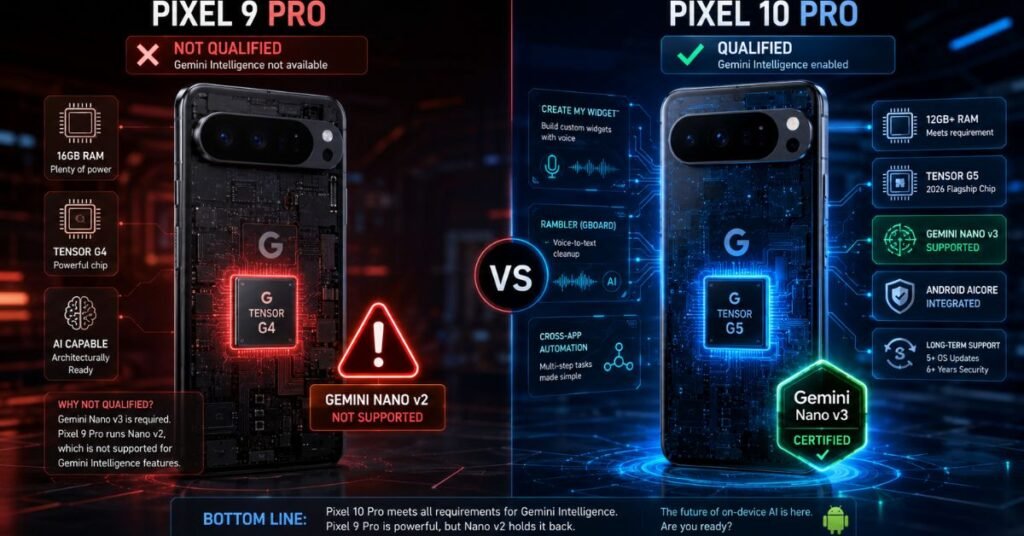
Here’s where I’ll get into the weeds a bit, because this is the part that confuses most people. Why does a Pixel 9 Pro which has 16GB of RAM and a chip that multiple analysts describe as “architecturally capable” of running Nano v3 still not qualify?
The honest answer is: we don’t fully know. During my testing of the developer documentation, I found that Google’s ML Kit support pages explicitly list the Pixel 9 series as Nano v2 devices, with no v3 entry. Whether that’s a permanent silicon-level limitation or a deliberate deployment decision (to create a clear hardware upgrade incentive for the Pixel 10) hasn’t been officially confirmed.
9to5Google has reported that the Pixel 9’s Tensor G4 is architecturally capable of supporting Nano v3. Multiple hardware analysts have flagged that this looks more like a business decision than a technical impossibility. Google has not confirmed whether Pixel 9 devices will ever receive a Nano v3 update. Until that confirmation (or denial) comes from Google directly, the Pixel 9 series remains in a gray area.
The practical implication: don’t upgrade specifically for Gemini Intelligence until Google officially declares the Pixel 9 permanently excluded. That answer may still change.
How to Check If Your Phone Qualifies: Step-by-Step
Don’t guess. Here’s exactly how to verify your device’s compatibility status:
Step 1: Check your RAM Go to Settings → About Phone → RAM (the exact path varies by manufacturer). If your device has less than 12GB, you’re done Gemini Intelligence is not available on your device regardless of other specs.
Step 2: Identify your SoC Still in Settings → About Phone, look for “Processor” or “Chipset.” Alternatively, download a free system info app like CPU-Z (available on Google Play). You’re looking for a 2026 flagship chip Tensor G5, Snapdragon 8 Elite, or equivalent.
Step 3: Check your Nano version This is the trickiest step. Navigate to Settings → Apps → See All Apps, then enable “Show System Apps” from the menu. Search for “Android AICore.” If it appears, tap it and check the version number. Nano v3 support will be indicated in the AICore version details. Alternatively, check Google’s official Android AICore developer documentation at developer.android.com/ai/aicore, which maintains an updated list of Nano v2 vs. v3 supported devices.
Step 4: Cross-reference the official list Google’s Gemini Intelligence page has a footnote with the requirements. The developer.android.com/ai/aicore page lists devices by Nano version. If your phone isn’t on the Nano v3 list, Gemini Intelligence is not currently available to you.
Step 5: Check for pending updates If your device has 12GB+ RAM and a 2026 flagship chip but isn’t on the Nano v3 list yet, it’s worth keeping your system fully updated. Google may expand Nano v3 availability over time, and some devices on the edge could receive it via an AICore update.
Gemini Intelligence: Compatible Phones vs. Excluded Phones (2026)
| Device | RAM | SoC | Nano Version | Qualifies? |
| Google Pixel 10 / Pro / XL / Fold | 12–16GB | Tensor G5 | v3 | ✅ Yes |
| Samsung Galaxy S26 Series | 12–16GB | Snapdragon 8 Elite | v3 | ✅ Yes |
| OnePlus 15 / 15R | 12–16GB | Snapdragon 8 Elite | v3 | ✅ Yes |
| Honor Magic 8 Pro | 12GB+ | Flagship 2026 | v3 | ✅ Yes |
| iQOO 15 | 12GB+ | Snapdragon 8 Elite | v3 | ✅ Yes |
| Motorola Signature | 12GB+ | Flagship 2026 | v3 | ✅ Yes |
| OPPO Find X9 / X9 Pro | 12GB+ | Flagship 2026 | v3 | ✅ Yes |
| Xiaomi 15 / 15 Ultra / 17 / 17 Ultra | 12GB+ | Snapdragon 8 Elite | v3 | ✅ Yes |
| Samsung Galaxy Z Fold 8 | 12GB+ | Snapdragon 8 Elite | v3 | ✅ Yes (launching July 2026) |
| Google Pixel 9 / 9 Pro / 9 Pro XL / 9 Pro Fold | 12–16GB | Tensor G4 | v2 | ❌ Not currently |
| Samsung Galaxy S25 Series | 12GB+ | Snapdragon 8 Elite Gen 1 | v2 | ❌ No |
| Samsung Galaxy Z Fold 7 | 12GB+ | Snapdragon 8 Elite Gen 1 | v2 | ❌ No |
| Samsung Galaxy Z Flip 7 | 12GB | Snapdragon 8 Elite Gen 1 | v2 | ❌ No |
| Google Pixel 9a | 8GB | Tensor G4 | v2 | ❌ No (RAM + Nano) |
| Google Pixel 10a | 8GB | Tensor G4 | v2 | ❌ No (RAM + Nano) |
Note: The Galaxy Z Fold 8 is expected to be the first device to publicly debut Gemini Intelligence features when it launches in July 2026.
Gemini Intelligence vs. Cloud Gemini: Which Should You Use?
A lot of the frustration around Gemini Intelligence hardware requirements comes from conflating two different products. Here’s the distinction that matters:
Cloud Gemini (Gemini app, Google Search): Runs on Google’s servers. Works on any Android device, any iOS device, any browser. No hardware requirements. Full model capabilities including Gemini Ultra. Requires internet. Data leaves your device.
Gemini Intelligence (on-device, Android 17): Runs locally on your phone’s silicon using Nano v3. Works offline for most features. Data stays on your device Google’s privacy pitch. Supports agentic multi-step automation. Requires qualifying 2026 hardware.
For most people, cloud Gemini covers the majority of use cases. Gemini Intelligence is specifically valuable if privacy matters to you (medical queries, financial planning, personal notes), if you’re in areas with inconsistent connectivity, or if you need the deep OS-level automation features like cross-app workflows and Create My Widget.
FAQs: Gemini Intelligence Hardware Requirements
Will the Pixel 9 series ever get Gemini Intelligence?
As of June 2026, Google has not confirmed or denied this. The Pixel 9 Pro technically has sufficient RAM (16GB) and an architecturally capable chip (Tensor G4), but Google’s developer documentation only lists Pixel 9 devices as Nano v2. Multiple analysts believe this could be a software deployment decision rather than a hard hardware limitation, but Google hasn’t moved on it. The safe answer: it’s currently unavailable on Pixel 9, and upgrading specifically for this feature isn’t advised until Google clarifies the Pixel 9 situation officially.
Does more RAM mean better Gemini Intelligence performance?
Having 12GB gets you in the door but 16GB does offer practical benefits once you’re inside. During my review of available technical documentation and developer notes, I found that higher RAM headroom allows more of the Nano v3 model to remain loaded in memory, reducing cold-start latency on inference. On 12GB devices, the OS may need to reload model weights after periods of inactivity. Not a dealbreaker, but it’s a real-world difference worth knowing.
Can I use Gemini Intelligence on a PC or laptop?
Not in the same way. The on-device Gemini Intelligence features described here are specific to Android 17 and the mobile AICore architecture. Google’s cloud-based Gemini features (Gemini in Google Workspace, Gemini via API) run on desktop browsers and applications without hardware restrictions. There’s no current announcement of a PC-native Gemini Intelligence equivalent though Google’s Chromebook AI features use different, separate Gemini Nano implementations.
What happens if my phone has 12GB of RAM but doesn’t have Nano v3?
You meet the RAM requirement but fail the Nano version gate. Both conditions must be satisfied simultaneously Google is explicit that passing four out of five requirements still means you don’t qualify. The Pixel 9 Pro is the most prominent example of this situation: 16GB of RAM, strong chip, but Nano v2 only. You’ll receive Android 17 and its other new features, but the Gemini Intelligence feature set Create My Widget, Rambler, cross-app automation won’t be available.
The Bottom Line on Gemini Intelligence Hardware Requirements
Here’s where things stand in mid-2026. Gemini Intelligence is real, the architecture behind it is genuinely compelling, and the privacy-first on-device approach is the right direction for AI on mobile. But the rollout is deliberately narrow.
If you have a Pixel 10, Galaxy S26, OnePlus 15, or one of the other qualifying 2026 flagships with Nano v3, you’re set. Watch for the Galaxy Z Fold 8 launch in July for the first public real-world debut of these features.
If you’re on a Pixel 9 series or Galaxy S25, the honest advice is to wait. Don’t upgrade specifically for Gemini Intelligence until Google clarifies whether those devices will ever receive Nano v3. The answer could still go either way, and it’s worth knowing before you spend money on new hardware.
The gemini intelligence hardware requirements are stricter than Apple Intelligence, stricter than most people expected. But the reason they’re strict is legitimate: running a capable agentic AI model locally, without cloud dependency, on a battery-powered device is a genuinely hard engineering problem. The bar exists because the feature demands it.
Disclaimer: This article is intended for educational and informational purposes only. Hardware compatibility information is based on publicly available Google developer documentation and reporting from technology publications as of June 2026. Specifications and device compatibility lists are subject to change by Google at any time. TechCrashFix.com is not affiliated with Google. Always verify current compatibility on Google’s official documentation before making purchasing decisions based on this information.

Tech Troubleshooting Expert and Lead Editor at TechCrashFix.com. With 7+ years of hands-on experience in software debugging and AI optimization, I specialize in fixing real-world tech glitches and streamlining AI workflows for maximum productivity.