

Most PC fan noise is caused by three things: Dust buildup, Aggressive BIOS settings, or a Failing bearing. Before buying new parts, kill high-CPU tasks in Task Manager, blast the heatsink with compressed air (holding the blades still), and switch your BIOS fan profile to “Silent.”
The “Noise-to-Component” Diagnostic Table
Use this table to pinpoint the culprit in seconds.
| Sound Type | Likely Culprit | Immediate Action |
| High-Speed Whoosh | CPU/GPU Overheating | Check Task Manager; Apply new thermal paste. |
| Rhythmic Clicking | Stray Cable / Loose Screw | Open case; Secure cables with zip ties. |
| Grinding / Growling | Failing Sleeve Bearing | Lubricate bearing or replace fan. |
| High-Pitched Whine | Coil Whine (GPU/PSU) | Limit frame rates; Check AIO pump speed. |
| Vibrating / Rattling | Loose Chassis Mount | Tighten mounting screws; Use rubber gaskets. |
Tools You’ll Need for the Job
- Compressed Air: For non-contact dust removal.
- 90% Isopropyl Alcohol & Q-Tips: For “caked-on” grime.
- Precision Screwdriver Set: To tighten mounting points.
- Machine Oil (Optional): Only for non-sealed bearings.
- Zip Ties: For cable management.
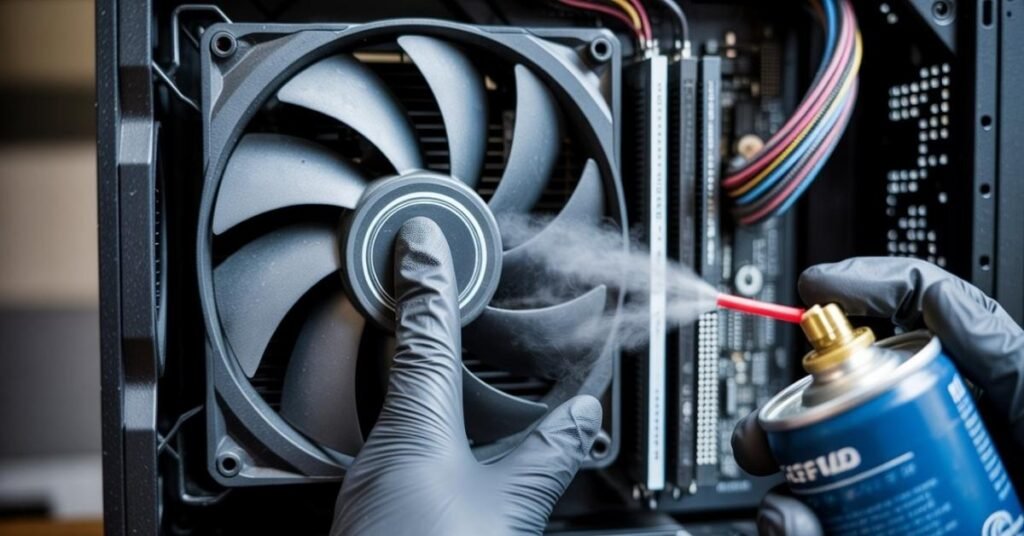
How do I clean a PC fan without damaging the motherboard?
Dust is the most common cause of noise. It increases the mass of the fan blades, causing an imbalance that creates vibration. Furthermore, dust clogs the Heat Sink fins, leading to Thermal Paste degradation effectiveness and forcing your fans to run at higher Decibel (dB) levels to keep up.
The “Finger-Hold” Technique (Critical Safety)
When I clean a rig, I never let the fan spin freely. Using compressed air to “super-spin” a fan can act like a generator, sending a voltage spike back into the motherboard headers.
- Step: Place one finger firmly on the center hub of the fan to keep it stationary.
- Step: Use short, 1-second bursts of compressed air.
- Pro Tip: If the dust is oily, dip a Q-tip in Isopropyl alcohol. Clean the “leading edge” of the blades this is where the most noise-generating turbulence occurs.
How can I change PC fan speed in the BIOS?
Sometimes your hardware is fine, but your PWM (Pulse Width Modulation) settings are too aggressive. PWM allows your motherboard to control fan speed with precision. If your BIOS is set to “Performance Mode,” your fans will ramp up even during light web browsing.
- Enter BIOS: Restart and tap F2 or Del.
- Navigate to Q-Fan Control: (Names vary by brand like ASUS, MSI, or Gigabyte).
- Optimize the Curve: Switch from “Full Speed” to “Silent” or “Manual.”
- DC vs. PWM: Ensure your 4-pin fans are set to PWM mode and 3-pin fans are set to DC control for the most accurate voltage regulation.
Why is my PC fan making a grinding noise?
If you hear a mechanical “growl,” you are likely dealing with a physical failure in the Sleeve Bearing or Ball Bearing.
- Sleeve Bearings: Common in cheap case fans. They use a lubricant that eventually dries out.
- Ball/Fluid Dynamic Bearings (FDB): These are quieter and last longer but can still fail if the seal is broken.
The Fix: You can sometimes rescue a sleeve bearing by peeling back the sticker on the hub and adding one drop of sewing machine oil. Never use WD-40. WD-40 is a solvent, not a lubricant; it will stripped away the remaining factory grease and cause the fan to seize permanently within weeks.
Is it fan noise or AIO pump whine?
If you have a liquid-cooled build, that annoying buzz might not be a fan at all. It could be the AIO (All-In-One) pump.
- Air Bubbles: If the pump is the highest point in your loop, air bubbles get trapped in the block, causing a “crackling” noise.
- The Fix: Ensure your radiator is mounted higher than the pump block. This allows air to settle at the top of the radiator, keeping the pump submerged and silent.
Static Pressure vs. Airflow Fans: Which is quieter?
In 2026, we categorize fans by their purpose.
- Static Pressure Fans: Designed to push air through tight spaces (like radiators). They have wide blades and often run louder because they are fighting resistance.
- Airflow Fans: Designed to move air through open cases. If you use an Airflow fan on a thick radiator, it will spin at max RPM but move very little air, resulting in high noise and high heat. Match the fan to the job to keep the dB levels under 25.
Summary FAQ
Indirectly, yes. A loud fan often means the CPU is overheating. If the temperature exceeds safe limits, the system will trigger a “Thermal Shutdown” to protect the silicon.
A quiet PC usually operates between 15dB and 25dB at idle. Under heavy gaming, 35dB to 45dB is normal. Anything over 55dB (the volume of a normal conversation) indicates a problem.
If a 120mm fan costs $15 and requires oiling every month, your time is better spent replacing it with a Fluid Dynamic Bearing (FDB) fan that is rated for 100,000 hours of silence.
If you find that your AI tools are lagging while you troubleshoot your system, you can quickly fix ChatGPT if it’s stuck on a “Thinking” loop by following these five simple steps to break the cycle and restore your workflow.